
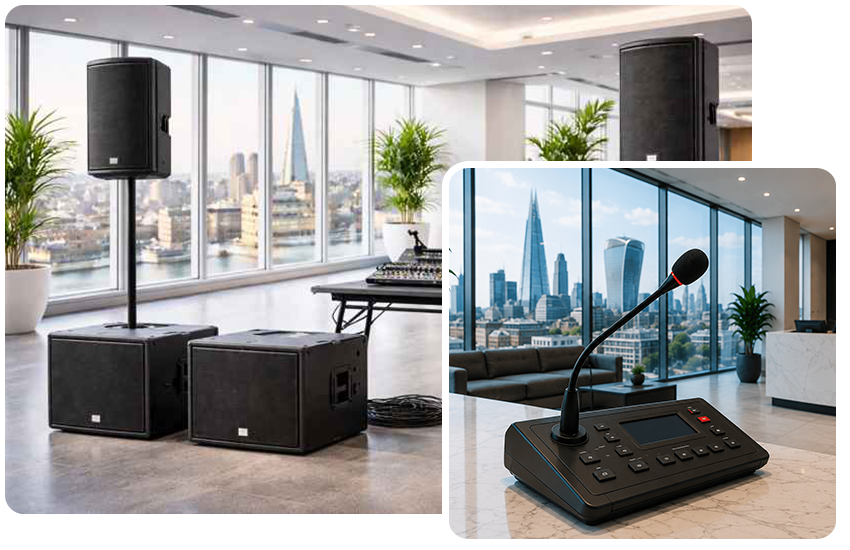
When you are arranging a conference, a meeting or a corporate event, the sound will generally go unnoticed by guests if it is working properly – but they will at once realise that it isn’t.
An event which is otherwise well organised can be quickly damaged if a presenter has an unreliable microphone, the delegates at the back of the room have difficulty in hearing, or if feedback interferes with a keynote address.
Then what kind of public address system do you really need for a conference?
The setup will vary according to the number of delegates, the size and arrangement of the venue, the number of speakers or panellists, and the way the event is going to be conducted; for example, an event for 40 people in a hotel meeting room requires a completely different arrangement from a conference with 500 delegates which includes a stage, panel discussions and an audience Q&A session.
In this guide we will explain the equipment you might need and show you how to select the appropriate conference PA system without unnecessarily specifying the requirements of your event.
What makes conferences require a PA system?
With only a small number of people present, amplification needn’t be used at all; but when addressing a larger audience, depending on someone’s natural speaking voice soon becomes impractical.
A public address system used at a conference is able to distribute speech and other audio clearly over the entire venue.
It may be used for:
- Keynote presentations
- Speeches
- Panel discussions
- Audience Q&A sessions
- Video presentations
- Walk-on and background music
- Awards
- Announcements
- Remote or hybrid speakers
The aim is not just to increase the volume of the presenters.
A well-designed public address system should ensure that speech sounds natural, clear and consistent all over the room, so that a person sitting at the back can follow the presentation just as easily as someone sitting close to the stage.
How large a PA system do I need for my conference?
Delegate numbers can be a good starting point, even though they shouldn’t be used on their own.
The room’s dimensions, the height of the ceiling, the arrangement of the seats, and the acoustics all have an effect on the final system.
Here’s a practical guide.
Small Meetings – Up to 30 People
The kind of PA system you will need for a boardroom meeting or a small presentation is a compact one.
A typical setup could include:
- One or two compact powered speakers
- One wireless handheld or lapel microphone
- Small audio mixer
- Laptop audio connection
In a number of smaller rooms speakers might in fact be unnecessary.
Amplification is useful in cases where the presentations involve video or when it is necessary for the speaker to be heard clearly without having to speak louder.
Conferences for 30–100 Delegates
In the case of a normal hotel conference room or corporate presentation, two experienced speakers are often sufficient.
A typical setup might include:
- Two powered PA speakers
- Speaker stands
- Digital or analogue mixer
- One or two wireless microphones
- Laptop audio connection
- Appropriate cabling
When you are organising panel discussions or audience Q&A sessions, you should plan for extra microphones at the beginning.
Conferences for 100–250 Delegates
At this size, it isn’t always the correct idea to just increase the volume.
The objective is to obtain even coverage.
A typical system may include:
- Two or more professional PA speakers
- Digital mixing console
- Multiple wireless microphones
- Lectern microphone
- Laptop and presentation audio
- Stage monitor where required
- Audio technician
The position of extra speakers might be placed further back instead of making the front speakers too loud, depending on the shape of the room.
It can make things much more comfortable for delegates who are sitting close to the stage.
Conferences for 250–500 Delegates
Big conferences need more careful planning.
Equipment could include:
- Multiple professional speakers
- Additional fill or delay speakers
- Digital mixing console
- Multiple wireless microphone channels
- Lectern microphone
- Headset or lapel microphones
- Stage monitoring
- Playback equipment
- Dedicated sound engineer
It becomes especially important to position the speaker.
Rooms that are long, rooms that are wide, balconies and odd seating arrangements are all capable of producing areas in which sound becomes quieter or less intelligible.
Conferences With 500+ Delegates
The PA system should usually be specially designed for major conferences and corporate events within the venue.
Depending on the location, this could involve:
- Line-array speaker systems
- Multiple speaker positions
- Delay speakers
- Digital mixing consoles
- Multiple wireless microphone systems
- Stage monitoring
- Audio playback systems
- Redundant equipment
- Dedicated audio engineers
At this level, it’s not just a matter of hiring ‘two large speakers’.
The importance of coverage, system control, microphone coordination and having a backup plan all come into play.
What microphones do I need for a conference?
One of the most important components of a conference sound system is the microphone.
Various sections of your event could make use of different kinds of microphones.
Wireless Handheld Microphones
Handheld microphones are very versatile.
They’re particularly useful for:
- Audience questions
- Hosts
- Introductions
- Awards
- Panel discussions
Two microphones can be of some help during the audience Q&A session, since while one delegate is speaking the other delegate can be attended to using the second microphone.
Lapel Microphones
Lapel microphones, which are also known as lavalier microphones, are attached to the presenter’s clothing.
They are useful in the situation where the speaker needs to keep their hands free.
They work particularly well for:
- Presentations
- Interviews
- Keynote speakers
- Demonstrations
Headset Microphones
The microphones on the headset place the microphone nearer to the presenter’s mouth.
They are a suitable choice for people who move around the stage or who need their microphone to be positioned consistently.
They’re commonly used for:
- Keynote speakers
- Trainers
- Product demonstrations
- Presenters moving around a stage
Lectern Microphones
A dedicated lectern microphone is a neat and professional solution if speakers are using a lectern.
It is especially useful in the case where several speakers occupy the same presentation position throughout the day.
How many microphones do I need?
Instead focus on how the conference will really function rather than just on the number of presenters.
For example, imagine you have:
- One host
- One keynote speaker
- Four panellists
- Audience Q&A
You could end up needing a great deal more than just one or two microphones.
The panel might have individual microphones, and wireless handheld microphones could be used for audience questions.
That is the reason why giving your PA hiring company with an event schedule can be very useful.
They are able to tell who is going to speak, at what time they will be speaking and whether the microphones need to be shared.
What About Panel Discussions?
Panel discussions need especially careful microphone planning.
It is rare for a discussion to go smoothly when six people share one microphone and pass it on among themselves.
Whenever possible, each of the regular panelists should have access to their own microphone.
As a result, conversations become considerably more natural and there are no pauses when the microphones are being passed around.
A sound technician is also in a position to adjust the levels of the microphones and to mute those microphones which are not currently in use.
Shall I need to have speakers at the back of the room?
.
It is a common error to think that bigger venues require more powerful speakers placed at the front.
Picture yourself sitting five metres away from a very noisy speaker since it has to be heard by a person thirty metres away.
That’s not a good experience.
In long conference rooms it’s possible to place additional delay speakers further back.
They reproduce the identical audio at a carefully regulated level in order that the sound may remain consistent throughout the venue.
It is possible to achieve clearer speech without having to make the noise level in the front rows unnecessarily high.
Do Conferences Need Subwoofers?
Not always.
Subwoofers are responsible for producing low-frequency sound and are especially important when it comes to music.
Since the conference was made up almost entirely of speeches and presentations, large subwoofers might offer only a small advantage.
However, they can be useful when the event includes:
- Walk-on music
- Promotional videos
- Awards sequences
- Entertainment
- DJs
- Live performances
Another reason why conference public address systems should be specified in relation to the event rather than just on the basis of the number of guests.
Connecting Laptops and Presentation Audio
Conference presentations are now beginning to feature embedded videos, music, animations, and speakers from remote locations.
Your audio system therefore has to include more than just microphones.
It’s worth confirming how sound will be played from:
- Presentation laptops
- Video playback systems
- Teams or Zoom calls
- Phones or tablets
- Media players
Checking the connections before the delegates enter the room will avoid any embarrassing delays later on.
What About Hybrid Conferences?
Hybrid events introduce another layer of complexity.
If people are joining through Zoom, Microsoft Teams or another conferencing platform, the audio needs to work in both directions.
People watching remotely need to hear what’s happening in the room.
People inside the venue also need to hear remote participants.
Depending on the event, this can require additional audio routing, interfaces and microphone planning.
For important hybrid conferences, technical support is highly recommended.
Does the Conference Venue Make a Difference?
Absolutely.
Two conferences, each with 200 delegates, may need entirely different public address systems.
Important considerations include:
Room shape
The conference suite, if it is long and narrow, will need more speakers placed further inside the room.
Ceiling height
The acoustics of large rooms are different from those of small meeting rooms.
Hard surfaces
Materials such as glass and concrete, along with others that are reflective, can increase the effect of reverberation and make it more difficult to understand what is being said.
Seating layout
Delegates are arranged in different ways due to the use of theatre-style seating, cabaret tables, and classroom layouts.
Stage position
The place where the stage is situated influences the positions in which speakers can safely and effectively be placed.
Existing venue equipment
Sound systems have already been installed in some hotels and conference centres.
It doesn’t mean that they are therefore appropriate for your specific event, so it’s worthwhile to verify what is available.
Should I have a sound engineer for my conference?
In the case of a simple setup involving one microphone and two speakers, you probably won’t need a technician for the entire event.
For more complex conferences, having an engineer can make a great deal of difference.
We would generally recommend considering technical support when you have:
- Multiple presenters
- Several wireless microphones
- Panel discussions
- Audience Q&A
- Videos and presentation audio
- Hybrid attendees
- A large venue
- More than one room
- A high-profile corporate event
The engineer will be able to keep an eye on the levels, handle the microphones, play the audio cues and attend to any technical problems without the organiser having to concern themselves with them.
At bigger conferences they usually carry out a test of the system before the event starts.
Don’t Forget the Soundcheck
A simple method of reducing problems is to allow sufficient time for setting up and testing.
It would be best if the microphones were tested by the people who are actually going to use them.
A proper soundcheck allows the technician to check:
- Microphone levels
- Speaker coverage
- Presentation audio
- Video playback
- Wireless microphone frequencies
- Feedback
- Stage monitoring
- Remote callers
It is far easier to spot a problem at 8:00am than it is to discover it when the keynote speaker walks onto the stage at 9:00am.
Should I Hire or Use the Venue’s PA System?
In many cases the venues which host conferences have their own audio-visual equipment, and this will be quite adequate for simple events.
You can’t assume that the statement “PA system included” tells you all the information you need.
Ask:
- The number of microphones contained is?
- Are wireless microphones available?
- What kind of microphones are they?
- Are technicians included?
- Can laptop audio be connected?
- Does the system provide coverage for the whole room?
- Can I connect more equipment?
- Is there backup equipment available?
When it comes to bigger or more important events, employing a dedicated PA system gives you a great deal more control over the specifications.
Common Conference Audio Mistakes
Proper planning is often enough to avoid certain audio problems.
Not Having Enough Microphones
When you have five panellists, don’t find out that you have only two microphones until the event begins.
Putting All the Speakers at the Front
In long rooms, adding more speakers can give better coverage than just increasing the volume.
Forgetting About Audience Questions
When running a Q&A session, you should plan the physical movement of the microphone to the delegates.
Ignoring Presentation Audio
The impressive opening video won’t make much of an impact unless people are able to hear it.
Leaving Setup Until the Last Minute
Make sure there is sufficient time available for the installation of the equipment, for testing it, and for having a proper soundcheck.
Choosing Equipment Based Only on Wattage
More watts doesn’t automatically mean better sound.
Coverage and correct speaker positioning are often far more important.
Conference PA System Checklist
Before requesting a PA hire quote, try to have the following information available:
- Event date
- Venue
- Number of delegates
- Room dimensions if available
- Seating arrangement
- Number of presenters
- Number of panellists
- Whether audience Q&A is planned
- Whether presentations contain audio
- Whether remote speakers will join
- Whether music will be played
- Event start and finish times
- Access times for setup
- Whether a technician is required
Don’t worry if you don’t know everything.
An experienced PA hire company should be able to ask the right questions and recommend an appropriate setup.
How Much Does Conference PA System Hire Cost?
There isn’t one standard price because conference requirements vary enormously.
A meeting that is simple and needs only two speakers together with a wireless microphone will obviously cost a great deal less than a conference for 500 people which requires several speakers, six wireless microphones, a digital mixing console and an engineer for the whole day.
The main factors affecting cost include:
- Audience size
- Venue size
- Number of speakers required
- Number and type of microphones
- Mixing equipment
- Event duration
- Delivery and collection
- Setup requirements
- Technician hours
- Additional AV equipment
It is usually more advantageous to state your requirements for the event and ask the hire company to suggest an appropriate package.
What conference PA system is the best?
No single PA system is the best choice for all conferences.
For a small corporate presentation, the only things needed might be two compact professional speakers and a wireless microphone.
In the case of a big conference, the right approach would be to have several speakers, use a number of wireless microphones, employ a digital mixer, include delay speakers and have an experienced technician on hand.
The important thing is that the system is designed around your audience, venue and event format.
Need PA System Hire for a Conference?
If you’re organising a conference, corporate meeting, seminar, awards ceremony or business event, tell us what you’re planning and we’ll help you work out exactly what equipment you need.
We can provide PA systems for everything from small presentations to large-scale corporate events, including speakers, wireless microphones, mixing equipment and technical support.
There’s no need to work out speaker wattages or microphone specifications yourself.
Send us your event date, venue, approximate number of guests and a brief description of how the event will run, and we can recommend a suitable PA system and provide a quotation.